Saturday, 24 August 2013

WordPress Installation with xampp server


 WordPress Installation with xampp server :-
Wordpress –
        WordPress is a free, open-source personal publishing system that allows you to easily create a complex blog, or web log, on your site. Written in PHP and supported by a MySQL database, WordPress offers intuitive administrative tools and sophisticated design features that make it easy to develop and integrate a personal or professional blog on your site.
Steps For Xampp Installation :-

.     1   Firstly Install xampp server.


2.   Wait for the installation process.


3.   Click “YES” for the complete installation of xampp server on your system


4.   Now goto your browser and type “localhost” or “127.0.0.1”


5.   Now Click on “MySql” Admin to create Database


6.   Now create “Database”

7.   Now goto C:/ - Xampp Folder


8.   Open “Xampp Folder and goto “htdocs”


9.   Put “Wordpress” file in the “htdocs” folder


10.                     Now goto your browser and type “localhost” or “127.0.0.1”


11.                     Now create a configure file for the Installation of “Wordpress”


12.                     Click on “Let’s go” button.

13.                     Enter your Database connection details


14.                     Now fill up your “Information and Settings”


15.                     Now Wordpress is successfully Installed

16.                     Now login with your “Login Name and Password”


17.                     Now you have successfully Intalled Wordpress


·       How to Intall Wordpress Theme ?

1.   Goto “Dashboard – Appearance – Themes and click on “Install Themes” option


2.   Click on “Choose File” and Select your Wordpress Theme. As I have downloaded some Themes.


3.   Now Click on “Activate” option


4.   Here My Wordpress theme is Succesfully Installed and Activated.


Thank you.......


Friday, 23 August 2013

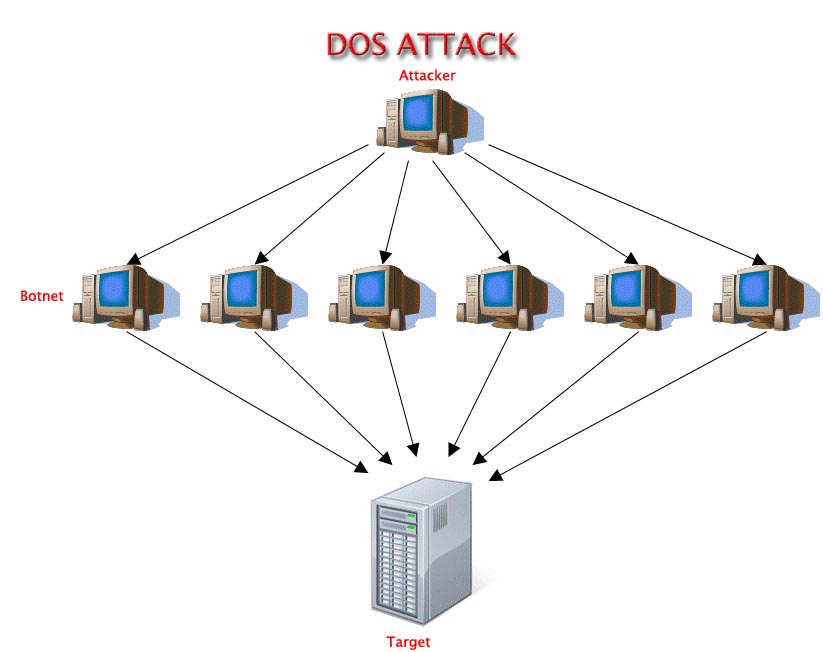
DOS Attack is very simple, easy step by which you can block the given server.... But risky..... so "Do it on your own risk"


DOS ATTACK

z
                                                DOS Attack is a part of ethical hacking.. 

DOS Attack is very simple, easy step by which you can block the given server....
But risky..... so "Do it on your own risk"

Easy steps to do DOS Attack=>
 #1
 Firstly open Backtrack 5.


                                                                                                                                                                  @Browser Work via Backtrack


#2
then open google in the given backtrack browser and then find "slowloris.pl"
                                                                                                                                                                
 
#3
Copy script "slowloris.pl" and paste it on desktop in text file via notepad


#4
Again open google and now find "lbd.sh" now similarly copy script and paste it via notepad...


@Konsole Terminal Work Via Backtrack 5


#5
Open konsole terminal and type "cd Desktop"


#6
now type  "nano slowloris.pl" and tab the enter key  


#7
Now press functional key "f2" if there is something confirmation menu pop up
 then tab "y" and then enter
                                                                                                                                                                
 
#8
"nano lbd.sh and then tab enter


#9
Now press functional key "f2" if there is something confirmation menu pop up
 then tab "y" and then enter
                                                                                                                                                              
 
#10
now type "chmod 755 *" then enter


#11
type "./lbd.sh (your window ip)"and tab enter


 #12 
 again "./slowloris.pl -dns" then type your "windows ip"


#13
if you have did your work perfectly then your are a magician ..... because you
have hacked the given server........!!!
                                                                                                                                                             
 
#14
And if you want to resume the server in the normal mode then type "ctrl+z"
and after doining this you will be resumed within 10-15 mins..